public-api-docs
Wunder Mobility API Basics
Overview
This document covers the essential concepts for working with the Wunder Mobility API, including authentication, error handling, user management, and internationalization.
Important Note on API Responses: The API response will not include fields that have been set to null. It is the responsibility of the developer using the API to handle any missing fields on their end. This decision is subject to change and any updates will be reflected in the API documentation.
Authentication & Authorization
The Wunder Mobility API uses JSON Web Tokens (JWT) passed as Bearer tokens in the Authorization HTTP header to authenticate and authorize requests.
See Authentication for sign-in, token refresh, two-factor authentication and token verification.
Error Codes
The API uses standardized error codes to communicate issues. For a complete list of error codes and their meanings, see the Error Codes document.
Terms & Conditions Handling
When T&C Acceptance Is Required
When accessing resources that require Terms & Conditions acceptance, users must have accepted the latest version of the T&C associated with those resources. This applies to all resources except those available without authentication.
Retrieving Terms & Conditions
You can request the current T&C in two ways:
- By branch: GET /terms-and-conditions?branchId={branchId}
- By vehicle: GET /terms-and-conditions?vehicleId={vehicleId}
Handling T&C Errors
If a user attempts to access a resource without accepting the latest T&C, the API returns an error. The most common T&C-related error codes are:
- U601: User hasn’t agreed to the terms and conditions yet
- U602: User hasn’t agreed to the latest terms and conditions yet
For a complete list of T&C error codes, see the Terms and Conditions section in Error Codes.
User Handling
How API Users Work
When accessing the Wunder Mobility MaaS API, your application uses an API User to:
- Create users that are managed by your application
- Modify managed users
- Access resources on behalf of managed users (impersonation)
Your application must track the users it manages using their UUID, which is returned when a user is created.
Tip: Use the customProperties field to store your own user ID for easier cross-referencing between your system and Wunder Mobility.
User Types
The Wunder Mobility backend supports three types of users:
| User Type | Purpose | Typical Use Case |
|---|---|---|
| Verified Users | End users who authenticate with email/password or phone/code | An end-user mobile app that directly accesses the Wunder Mobility backend |
| API Clients | External applications accessing Wunder Mobility resources | Your application that manages its own users but uses Wunder Mobility services |
| Impersonate Users | Users managed by an external application, mapped to verified users | User accounts created and managed by your API Client for impersonation |
Key Concept: API Clients create and manage Impersonate Users, then use impersonation to access resources on their behalf.
Internationalization
The Challenge
Wunder Mobility supports international operations across multiple regions. To enable this, many API operations require you to specify which branch (geographic/operational region) the action applies to.
Why Branches Matter
Specifying the correct branch is critical for these operations:
| Operation | Why Branch Matters |
|---|---|
| User creation | Defines the user’s home branch (home-billable-branch) |
| Voucher redemption | Determines which balance receives the voucher amount |
| Package purchase | Determines which wallet stores the purchased package |
Key Terminology
- Home Branch (home-billable-branch): The user’s home base. If a user rents a vehicle outside their home branch, they are considered roaming.
- Roaming: When a user operates outside their home branch. Roaming users cannot purchase packages and are limited to pay-as-you-go payment methods.
Finding the Right Branch
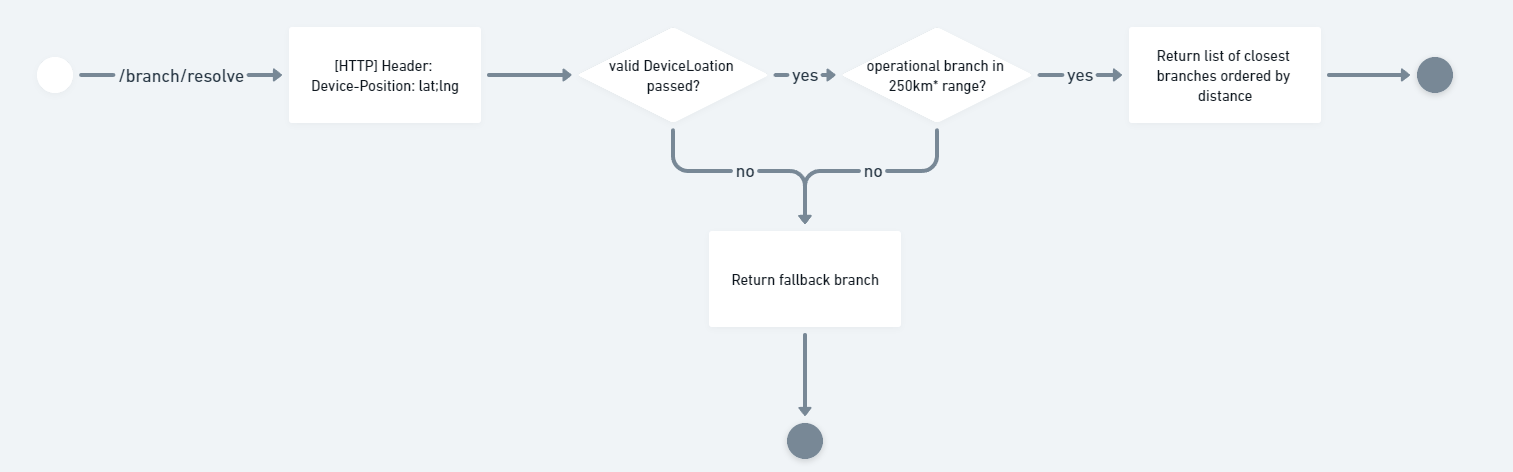
Use the Branch Resolver API to determine which branch to use for an operation:
Endpoint: GET /branches/resolve
Documentation: GET /branches/resolve
The branch resolver accepts a user’s location and returns a list of billable branches, ordered by distance (closest first).
Important: If no user location is provided, the branch resolver returns the operator’s fallback branch.